


Appointment Booking WooCommerce Payments 1.3.0
Last Update: May 7, 2026
- Updated
- Lifetime updates
- Secure Payment
-74%
-74%
Description
quick summary
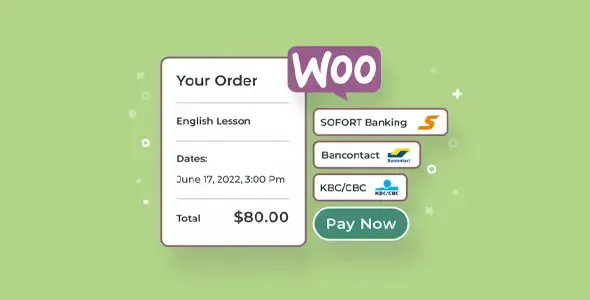
Appointment Booking WooCommerce Payments is designed for businesses that sell services by appointment through a store built with WordPress and WooCommerce. It allows you to connect appointment booking and payment processing in the same workflow, eliminating manual email exchanges, scheduling errors, and separate payments. It’s especially useful for professionals, consultancies, healthcare centers, training providers, and any project where each sale is a scheduled appointment paid for through the store.
What problem does it help solve?
On many WordPress sites that offer hourly services, appointment management and payments are handled separately. The client fills out a form, waits for confirmation, then receives a separate payment link, and in the meantime, the schedule changes. This leads to overlapping bookings, missed slots, and an unclear experience for the end user.
When you work with WooCommerce without a dedicated booking layer, each service behaves like a regular product: the customer pays, but no one defines the day or time they’ll receive the service. This becomes complicated when managing multiple professionals, different session lengths, or limited availability. If you’ve ever experienced a customer paying and then having to negotiate the schedule via WhatsApp or email, you already know the problem this product addresses.
Appointment Booking WooCommerce Payments connects both worlds within WordPress: the booking calendar and the WooCommerce checkout process. The typical “book first, pay later” friction disappears, and each order is linked to a specific date and time, drastically reducing misunderstandings and the need for manual management.
Why this solution makes a difference
In real-world projects, what ultimately exhausts the team isn’t so much acquiring clients, but rather organizing their schedule flawlessly. Every appointment change involves checking emails, updating entries in an external calendar, and adjusting the order. When you start noticing that you’re spending more time managing bookings than actually providing the service, the current structure becomes unsustainable.
Appointment Booking WooCommerce Payments introduces a seamless workflow: the user chooses the service, selects the date and time directly within the store, and pays in a single process. In the WordPress dashboard, bookings are no longer isolated notes but rather clear records linked to WooCommerce orders. This reduces last-minute calls, cancellations due to misunderstandings, and errors when recording appointment times.
On the other hand, having the booking calendar aligned with payments allows for a much more precise analysis of which time slots work best, which services are booked most frequently, and where gaps occur. This information transforms WooCommerce into a true operations center for an appointment-based business, without relying on external calendars that don’t communicate with the store.
Signs you need this product
- You already receive payments in WooCommerce for services, but you manage the date and time via email, WhatsApp, or calls.
- You find yourself with overlapping appointments because different people on the team manually book them in the calendar.
- Note that reviewing, confirming, and rescheduling reservations takes up hours that are not billed.
- You sell services at different times of day and it’s difficult to know which days are fully booked and which have openings.
- You have several types of service with different durations, and the current system doesn’t allow you to properly control availability.
- This appears when you start receiving bookings from various time zones and it is no longer feasible to “adjust by eye” each appointment.
When does it make sense to use it (and when doesn’t)
Appointment Booking WooCommerce Payments makes sense when your core business is services that require a specific date and time: one-on-one sessions, video consultations, private lessons, treatments, project meetings, or hourly rentals. In this context, integrating booking and payment processing into WooCommerce avoids duplicating tasks and keeps all operations within WordPress.
It also adds value when you want each purchase to automatically generate an appointment in your system, without having to re-enter data into an external calendar. If you manage multiple team members or need to assign specific schedules, centralizing this in the store gives you clear control over occupancy and daily capacity.
It’s not necessary for projects where you only sell downloadable digital products, memberships without associated appointments, or services that aren’t time-bound (for example, content writing with long deadlines but no meetings). In these situations, an hourly booking system doesn’t add real value and only complicates your workflow. The key is that your proposal includes scheduling time as part of the sale.
Who it fits best for
- Professionals who sell their time: consultants, coaches, legal or financial advisors who manage individual sessions or packages with appointments.
- Health and wellness businesses: small clinics, physiotherapists, psychologists, nutritionists or beauty centers that work by appointment.
- Academies, trainers, and mentors offering one-on-one classes, tutoring, or group sessions with limited spaces.
- Agencies and creative studios that need to schedule briefing meetings, project reviews, or deliveries with a fixed date.
- Physical spaces that are rented by the hour, such as meeting rooms, recording studios, or shared classrooms.
- Teams that already use WooCommerce as their billing platform and want to stop relying on separate appointment calendars.
Practical benefits
- Real operational improvement: Each WooCommerce order has its own associated appointment, which reduces intermediate steps and avoids having to manually reconcile orders with schedules in another system.
- Clear user experience for the customer: The user sees real-time availability, chooses the time slot that suits them, and pays in the same process, without waiting for subsequent confirmations.
- Agenda control and organization: You can check from WordPress which days are full, which professionals have openings, and how the workload is distributed.
- Team time savings: Back-and-forth emails to coordinate schedules decrease, freeing up hours for billable tasks or higher-value customer service.
- Reduction of errors and conflicts: Fewer duplicate appointments, fewer customers arriving at incorrect times, and fewer misunderstandings about what has been booked and paid for.
How it fits within WordPress
Appointment Booking WooCommerce Payments integrates seamlessly into the existing structure of a WordPress site with WooCommerce, adding a dedicated layer for managing appointments within the checkout process. Instead of creating static pages with separate forms, your services function like products with a calendar, managed from the same dashboard where you already manage orders, clients, and your catalog.
When working with WordPress, this means that the booking system isn’t an isolated external system, but rather an integral part of your ecosystem: it benefits from the payment methods you already use in WooCommerce, the same order dashboard, and the same customer base. This allows the team to see in one place what has been sold, when it will be processed, and who is responsible, without having to jump between multiple platforms to understand what’s happening each day.
Common usage scenarios
- A consultancy that sells 60-minute sessions from its WooCommerce store wants each booking to be paid for and scheduled automatically at the time of purchase.
- A physiotherapy center with several professionals needs to offer different schedules per therapist and control daily occupancy without resorting to spreadsheets or paper agendas.
- An online academy that offers individual tutoring to its students and wants them to choose and pay for their appointments directly from the WordPress platform, without additional email exchanges.
- A coworking space that rents meeting rooms by time slots and requires that each reservation generate an order in WooCommerce associated with a specific day and time.
Appointment Booking WooCommerce Payments FAQ
What differentiates Appointment Booking WooCommerce Payments from using a simple contact form for bookings?
With a contact form, the customer only submits one request, and you have to manually check availability, respond, negotiate the schedule, and then manage the payment separately. Appointment Booking WooCommerce Payments combines these steps: the user sees real-time slots, chooses their preferred time, and makes the payment within the same WooCommerce flow. This way, each confirmed booking is already paid for and linked to an order, eliminating double verifications and reducing your daily management workload.
How does Appointment Booking WooCommerce Payments help when I’m managing multiple types of services with different durations?
In businesses that offer a mix of short sessions, extended assessments, and multi-hour packages, manually managing the schedule leads to missed opportunities. Appointment Booking WooCommerce Payments allows you to treat each service as an item with its own dedicated time slot within your store. By linking each purchase to a specific time frame, you can easily avoid overlaps, better distribute the workload, and offer consistent availability for every type of service you sell.
Is Appointment Booking WooCommerce Payments useful if I already have an external calendar for my appointments?
If you work with an external calendar and then have to manually replicate every booking that comes into WooCommerce, you’re duplicating tasks and increasing the risk of errors. Appointment Booking WooCommerce Payments makes sense when you want your store to be the true central hub: appointments are scheduled and paid for directly from WooCommerce, without any parallel steps. Maintaining an external calendar for reference can still be useful, but the primary booking database then resides on your WordPress site.
What happens to reservations if I change prices or modify the service offering?
Existing bookings retain the terms and conditions agreed upon by the customer, while new services you publish will reflect any price or configuration changes you make. Appointment Booking WooCommerce Payments leverages WooCommerce’s logic, ensuring that any adjustments to your catalog are reflected in future bookings but do not affect confirmed commitments. This provides peace of mind for both your team and your customers.
Does it make sense to use Appointment Booking WooCommerce Payments if I only sell services with an approximate date and no fixed time?
In cases where you sell commissioned work with extended deadlines, such as graphic design with delivery in several weeks, the exact time isn’t critical. In these projects, a time-slot appointment system offers little value because management is based more on stages than on specific meetings. Appointment Booking WooCommerce Payments is most useful when your promise to the client includes a specific day and time for a meeting, whether in person or remotely, and you need to schedule accordingly.
Conclusion
Appointment Booking WooCommerce Payments is designed for businesses where every sale requires booking an appointment slot. By integrating bookings and payments within WooCommerce, it reduces manual work, minimizes scheduling errors, and provides a seamless customer experience. If your day revolves around scattered orders and appointments, centralizing both in your WordPress site transforms your store into the true hub of your operations, allowing you to focus your time on delivering the service, not on scheduling it.
$19.00 Original price was: $19.00.$4.99Current price is: $4.99.
- Lifetime Updates And Support
- Official product, ready to use
- Clean and virus-free files
- GNU GPL V2/V3 License
- Money-back Guarantee





Author

Category: WordPress Plugins
Get in Subscription – Unlimited Downloads for $14.99/mo
- 5000+ Items
- Unlimited Usage
- Support
Frequently asked question
How many sites can I use the products on?
You can use any product from our store on any website you want.
Will I get updates?
Of course. If you buy an individual product, you’ll get lifetime updates for that purchase.
On the other hand, if you purchase a membership, you will receive updates until your membership expires.
Are the products authentic?
Yes, each product is original. The difference with the author is that we distribute under the GNU GPL v2/3 regulations/license, so we don’t provide additional services from the author, such as customizations, etc. We also don’t provide license keys, and in the case of products that require one to work, we pre-activate them so they don’t require anything and you can use them seamlessly on any website you want.
Do you provide technical support?
Yes, and regarding time, it is usually on average within 24 to 48 business hours.
Now, there are times when, in less than a day, we have already provided an answer and a solution, depending on the case.
Are there download limits?
No. We don’t believe in that format, so you can download as many times as you want. No problem. We pay for high-quality professional storage just to avoid any issues.
Do you provide license keys?
No. It’s not feasible, since we’ve already experienced keys flying everywhere, and we could lose the corresponding accounts.
That said, while all products are original, in the case of products that require a license key to operate, we will take care of pre-activating them.
Refund if product unusable?
We’re here to make sure you’re 100% satisfied with your experience. Our Customer Support Team will do everything possible to ensure you’re comfortable with placing an order and happy with the products you download. But we also know sometimes things happen.
Due to the nature of digital media means that once you have downloaded a plugin or theme there’s really no way to ‘return’ it. No refunds will be given except in the case when the digital product is completely unusable.
If the digital product is unusable, we need time to try to fix it. Otherwise, we will make a refund.
Our support team is available 24/7, if you have any question or need help in installing or configuring digital products purchased on the website, please don’t hesitate to CONTACT US.
Please note that we are not developers of the provided products, so our technical support capabilities are limited.
We do not change product functionality and do not fix developer bugs.
In case you are accepted to get refund, payment refunds are processed within 5-7 business days. All refunds are issued to the original payments. It may take up to 5 days for your refund to be reflected in your PayPal account or bank statement. If you paid using a credit or debit card, the money will be refunded to your card. Depending on your card issuer, it can take up to 30 days for the refund to appear on your card statement.
IMPORTANT! Please CONTACT US first so we can handle your issues. If you arbitrarily open a dispute without contacting us first, your account may be suspended immediately without notice.
Description
quick summary
Appointment Booking WooCommerce Payments is designed for businesses that sell services by appointment through a store built with WordPress and WooCommerce. It allows you to connect appointment booking and payment processing in the same workflow, eliminating manual email exchanges, scheduling errors, and separate payments. It’s especially useful for professionals, consultancies, healthcare centers, training providers, and any project where each sale is a scheduled appointment paid for through the store.
What problem does it help solve?
On many WordPress sites that offer hourly services, appointment management and payments are handled separately. The client fills out a form, waits for confirmation, then receives a separate payment link, and in the meantime, the schedule changes. This leads to overlapping bookings, missed slots, and an unclear experience for the end user.
When you work with WooCommerce without a dedicated booking layer, each service behaves like a regular product: the customer pays, but no one defines the day or time they’ll receive the service. This becomes complicated when managing multiple professionals, different session lengths, or limited availability. If you’ve ever experienced a customer paying and then having to negotiate the schedule via WhatsApp or email, you already know the problem this product addresses.
Appointment Booking WooCommerce Payments connects both worlds within WordPress: the booking calendar and the WooCommerce checkout process. The typical “book first, pay later” friction disappears, and each order is linked to a specific date and time, drastically reducing misunderstandings and the need for manual management.
Why this solution makes a difference
In real-world projects, what ultimately exhausts the team isn’t so much acquiring clients, but rather organizing their schedule flawlessly. Every appointment change involves checking emails, updating entries in an external calendar, and adjusting the order. When you start noticing that you’re spending more time managing bookings than actually providing the service, the current structure becomes unsustainable.
Appointment Booking WooCommerce Payments introduces a seamless workflow: the user chooses the service, selects the date and time directly within the store, and pays in a single process. In the WordPress dashboard, bookings are no longer isolated notes but rather clear records linked to WooCommerce orders. This reduces last-minute calls, cancellations due to misunderstandings, and errors when recording appointment times.
On the other hand, having the booking calendar aligned with payments allows for a much more precise analysis of which time slots work best, which services are booked most frequently, and where gaps occur. This information transforms WooCommerce into a true operations center for an appointment-based business, without relying on external calendars that don’t communicate with the store.
Signs you need this product
- You already receive payments in WooCommerce for services, but you manage the date and time via email, WhatsApp, or calls.
- You find yourself with overlapping appointments because different people on the team manually book them in the calendar.
- Note that reviewing, confirming, and rescheduling reservations takes up hours that are not billed.
- You sell services at different times of day and it’s difficult to know which days are fully booked and which have openings.
- You have several types of service with different durations, and the current system doesn’t allow you to properly control availability.
- This appears when you start receiving bookings from various time zones and it is no longer feasible to “adjust by eye” each appointment.
When does it make sense to use it (and when doesn’t)
Appointment Booking WooCommerce Payments makes sense when your core business is services that require a specific date and time: one-on-one sessions, video consultations, private lessons, treatments, project meetings, or hourly rentals. In this context, integrating booking and payment processing into WooCommerce avoids duplicating tasks and keeps all operations within WordPress.
It also adds value when you want each purchase to automatically generate an appointment in your system, without having to re-enter data into an external calendar. If you manage multiple team members or need to assign specific schedules, centralizing this in the store gives you clear control over occupancy and daily capacity.
It’s not necessary for projects where you only sell downloadable digital products, memberships without associated appointments, or services that aren’t time-bound (for example, content writing with long deadlines but no meetings). In these situations, an hourly booking system doesn’t add real value and only complicates your workflow. The key is that your proposal includes scheduling time as part of the sale.
Who it fits best for
- Professionals who sell their time: consultants, coaches, legal or financial advisors who manage individual sessions or packages with appointments.
- Health and wellness businesses: small clinics, physiotherapists, psychologists, nutritionists or beauty centers that work by appointment.
- Academies, trainers, and mentors offering one-on-one classes, tutoring, or group sessions with limited spaces.
- Agencies and creative studios that need to schedule briefing meetings, project reviews, or deliveries with a fixed date.
- Physical spaces that are rented by the hour, such as meeting rooms, recording studios, or shared classrooms.
- Teams that already use WooCommerce as their billing platform and want to stop relying on separate appointment calendars.
Practical benefits
- Real operational improvement: Each WooCommerce order has its own associated appointment, which reduces intermediate steps and avoids having to manually reconcile orders with schedules in another system.
- Clear user experience for the customer: The user sees real-time availability, chooses the time slot that suits them, and pays in the same process, without waiting for subsequent confirmations.
- Agenda control and organization: You can check from WordPress which days are full, which professionals have openings, and how the workload is distributed.
- Team time savings: Back-and-forth emails to coordinate schedules decrease, freeing up hours for billable tasks or higher-value customer service.
- Reduction of errors and conflicts: Fewer duplicate appointments, fewer customers arriving at incorrect times, and fewer misunderstandings about what has been booked and paid for.
How it fits within WordPress
Appointment Booking WooCommerce Payments integrates seamlessly into the existing structure of a WordPress site with WooCommerce, adding a dedicated layer for managing appointments within the checkout process. Instead of creating static pages with separate forms, your services function like products with a calendar, managed from the same dashboard where you already manage orders, clients, and your catalog.
When working with WordPress, this means that the booking system isn’t an isolated external system, but rather an integral part of your ecosystem: it benefits from the payment methods you already use in WooCommerce, the same order dashboard, and the same customer base. This allows the team to see in one place what has been sold, when it will be processed, and who is responsible, without having to jump between multiple platforms to understand what’s happening each day.
Common usage scenarios
- A consultancy that sells 60-minute sessions from its WooCommerce store wants each booking to be paid for and scheduled automatically at the time of purchase.
- A physiotherapy center with several professionals needs to offer different schedules per therapist and control daily occupancy without resorting to spreadsheets or paper agendas.
- An online academy that offers individual tutoring to its students and wants them to choose and pay for their appointments directly from the WordPress platform, without additional email exchanges.
- A coworking space that rents meeting rooms by time slots and requires that each reservation generate an order in WooCommerce associated with a specific day and time.
Appointment Booking WooCommerce Payments FAQ
What differentiates Appointment Booking WooCommerce Payments from using a simple contact form for bookings?
With a contact form, the customer only submits one request, and you have to manually check availability, respond, negotiate the schedule, and then manage the payment separately. Appointment Booking WooCommerce Payments combines these steps: the user sees real-time slots, chooses their preferred time, and makes the payment within the same WooCommerce flow. This way, each confirmed booking is already paid for and linked to an order, eliminating double verifications and reducing your daily management workload.
How does Appointment Booking WooCommerce Payments help when I’m managing multiple types of services with different durations?
In businesses that offer a mix of short sessions, extended assessments, and multi-hour packages, manually managing the schedule leads to missed opportunities. Appointment Booking WooCommerce Payments allows you to treat each service as an item with its own dedicated time slot within your store. By linking each purchase to a specific time frame, you can easily avoid overlaps, better distribute the workload, and offer consistent availability for every type of service you sell.
Is Appointment Booking WooCommerce Payments useful if I already have an external calendar for my appointments?
If you work with an external calendar and then have to manually replicate every booking that comes into WooCommerce, you’re duplicating tasks and increasing the risk of errors. Appointment Booking WooCommerce Payments makes sense when you want your store to be the true central hub: appointments are scheduled and paid for directly from WooCommerce, without any parallel steps. Maintaining an external calendar for reference can still be useful, but the primary booking database then resides on your WordPress site.
What happens to reservations if I change prices or modify the service offering?
Existing bookings retain the terms and conditions agreed upon by the customer, while new services you publish will reflect any price or configuration changes you make. Appointment Booking WooCommerce Payments leverages WooCommerce’s logic, ensuring that any adjustments to your catalog are reflected in future bookings but do not affect confirmed commitments. This provides peace of mind for both your team and your customers.
Does it make sense to use Appointment Booking WooCommerce Payments if I only sell services with an approximate date and no fixed time?
In cases where you sell commissioned work with extended deadlines, such as graphic design with delivery in several weeks, the exact time isn’t critical. In these projects, a time-slot appointment system offers little value because management is based more on stages than on specific meetings. Appointment Booking WooCommerce Payments is most useful when your promise to the client includes a specific day and time for a meeting, whether in person or remotely, and you need to schedule accordingly.
Conclusion
Appointment Booking WooCommerce Payments is designed for businesses where every sale requires booking an appointment slot. By integrating bookings and payments within WooCommerce, it reduces manual work, minimizes scheduling errors, and provides a seamless customer experience. If your day revolves around scattered orders and appointments, centralizing both in your WordPress site transforms your store into the true hub of your operations, allowing you to focus your time on delivering the service, not on scheduling it.
Be the first to review “Appointment Booking WooCommerce Payments 1.3.0” Cancel reply
You must be logged in to post a review.
This week's best selling

Elementor Pro WordPress Plugin 4.0.4
Rated 4.83 out of 5

AI Puffer 2.4.29 (AI Power)

MotoPress Booklium WordPress Theme 2.0.0

WooCommerce Conditional Shipping and Payments 3.1.1

Moova Moving Services Elementor Template Kit
Savoy Minimalist AJAX WooCommerce Theme 3.1.8

Cocotax Accounting and Finance Consulting Elementor Kit

EduBee LMS Online Education Theme 1.4.1

Ditech IT Solutions Elementor Template Kit

Ultimate Membership Pro 13.7.4

Acadia Education WordPress Theme 3.2.0

Wallet for WooCommerce 5.5.0
Related products



WP MAPS PRO Plugin for Google Maps 6.0.4
Rated 5.00 out of 5

Ultimate Addons for WPBakery Page Builder 3.21.2
Rated 5.00 out of 5
Reviews
There are no reviews yet.