


Master Slider Touch Layer Slider 3.7.15
Last Update: May 11, 2026
- Updated
- Lifetime updates
- Secure Payment
-87%
-87%
Description
Quick summary
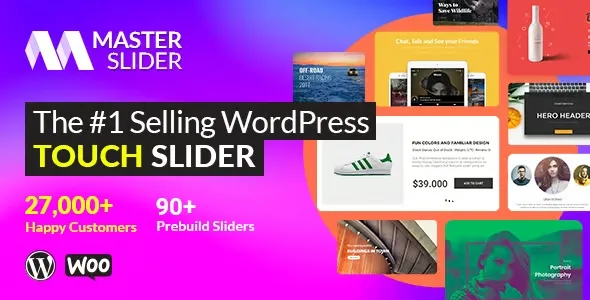
Master Slider Touch Layer Slider is a WordPress plugin designed to create professional layered sliders with touch navigation. It allows you to visually and dynamically showcase products, promotions, and featured content, enhancing the presentation of an online store and helping to capture the visitor’s attention from the first glance.
Overview
This type of WordPress slider plugin is designed to create presentations of images, banners, and interactive content without requiring any coding. Its main purpose is to offer an attractive and organized way to display key information on the visible part of a website, such as headers, featured galleries, or promotional sections.
In WordPress projects, it’s frequently used to enhance the homepage design, highlight services or products, and improve the site’s visual narrative. Thanks to its layers and effects, tools like Master Slider Touch Layer Slider allow you to build richer compositions than a simple image carousel, while maintaining an accessible workflow for editors and designers.
What is Master Slider Touch Layer Slider used for?
Master Slider Touch Layer Slider helps solve the problem of displaying a lot of important content in a small space without overloading the page. With a well-configured slider, an online business can present offers, main categories, or key messages in a rotating and organized way, improving user comprehension.
In e-commerce, it’s useful for highlighting promotional products, seasonal collections, or recent releases. On membership sites or online academies, it helps to emphasize courses, modules, or upcoming events. On corporate websites and landing pages, this type of tool adds value by combining images, text, and buttons in a single presentation, guiding the user to the most relevant sections of the digital project.
Who is it ideal for?
- Online stores and e-commerce businesses that need to visually showcase featured products, campaigns, and marketing messages, optimizing homepage space and improving click-through rates to product pages or categories.
- Corporate projects, service pages, portfolios, and personal branding sites where visual presentation is key to conveying professionalism, showcasing completed work, or communicating marketing messages clearly and attractively.
- Marketing teams, designers, and content managers seeking to control visual storytelling, organize campaigns, improve user experience, and increase conversion through banners, sliders with layers of text, and well-placed calls to action.
Key benefits
- It allows you to manage sliders and banners efficiently, centralizing the creation and updating of featured content in one place, making it easy to keep the website aligned with campaigns and business objectives without complex processes.
- It improves the user experience by offering smooth navigation, seamless transitions, and easily accessible content, helping visitors quickly find relevant information without having to scroll through long sections of the page.
- It offers flexibility and customization in slide design, with layers of text, images, and buttons that can be adapted to the project’s visual identity, allowing you to create compositions aligned with the brand and its message.
- It is suitable for sites with many products or sections, as it helps to prioritize what to show first and how to organize key information, avoiding overwhelming the user with too many static elements on the home page.
- It saves administrators time by allowing them to duplicate sliders, reuse structures, and adjust content without redesigning each section from scratch, reducing manual errors and facilitating the recurring management of campaigns and promotions.
Main features of Master Slider Touch Layer Slider
- It includes the ability to create multi-layered sliders, where each slide can combine background images with text, buttons, and other visual elements, resulting in presentations that are richer than a simple photo carousel.
- It focuses on providing a visual and design-oriented approach, with transition, animation, and layout options that help build dynamic headers, hero sections, and promotional banners consistent with the site’s style.
- It facilitates the organization and control of the workflow, allowing you to create different sliders for different pages or sections, maintain a clear structure, and update content without affecting other parts of the site.
- It usually integrates intuitive editing interfaces, where you can drag and drop elements, adjust texts and modify the order of the slides, making the daily management of the slider accessible even to non-technical users.
- It allows you to define playback behavior, such as automatic advance, the use of arrows or pagers, and the duration of transitions, offering detailed control over how the user interacts with the displayed content.
- Touch navigation is designed for mobile devices and touchscreens, allowing the user to swipe between slides, improving usability on smartphones and tablets and aligning with current browsing habits.
Use cases
- A WooCommerce store that places a slider at the top of the homepage with its main categories, recommended products, and active promotions, helping to direct traffic to the most profitable sections without overloading the design.
- A corporate website that uses a slider on the homepage to present its key services, featured testimonials, and company information sequentially, achieving a professional first impression and guiding the visitor to relevant internal pages.
- An online course project needs to showcase new releases, upcoming events, and suggested content on the homepage, using the slider as the central communication block to keep the site updated without constantly redesigning the structure.
Frequently Asked Questions about Master Slider Touch Layer Slider
What type of content can I display with Master Slider Touch Layer Slider?
With Master Slider Touch Layer Slider, you can display images, text, buttons, and other elements organized in layers within each slide. This allows you to create banners, headers, promotions, and product galleries that combine marketing messages, graphics, and calls to action into a single visual unit.
Is it suitable for an online store with many products?
Yes, this type of slider plugin is especially useful when you have a large number of products or categories. It allows you to highlight only a few key elements according to your business priorities, directing the user’s attention to what’s most relevant and preventing the homepage from becoming too long or confusing.
Can I use it on different pages of the site?
Typically, you can create multiple sliders and assign them to different pages or sections of your WordPress site. This way, you can have a main slider on the homepage, another specific to a category, or one dedicated to particular promotions, maintaining clear control over what is displayed in each location.
Does it require programming knowledge to set up the slides?
In general, you don’t need to know how to program to use Master Slider Touch Layer Slider. This type of tool typically offers visual interfaces with drag-and-drop options, text fields, and simple controls. This allows content editors and marketing professionals to create and modify sliders themselves.
Is it useful for improving the experience on mobile devices?
Yes, the focus on touch navigation makes the experience on mobile phones and tablets more natural, allowing you to swipe between slides with your finger. A well-designed slider helps display key information without forcing the user to scroll too much, improving usability on smaller screens.
Can I adapt the slider design to my brand’s visual identity?
Master Slider Touch Layer Slider is designed to be customizable. You can typically adjust colors, fonts, text sizes, and button styles to make the slider match the rest of your site’s design. This makes it easy to maintain visual consistency and reinforce brand identity on every slide.
Conclusion
Master Slider Touch Layer Slider is a tool designed to enhance the visual presentation of WordPress projects, allowing you to create layered sliders with accessible touch navigation. When properly configured, it helps organize key information, boost campaigns, and deliver a clearer and more engaging user experience on any type of professional website.
$39.00 Original price was: $39.00.$4.99Current price is: $4.99.
- Lifetime Updates And Support
- Official product, ready to use
- Clean and virus-free files
- GNU GPL V2/V3 License
- Money-back Guarantee





Author

Category: WordPress Plugins
Get in Subscription – Unlimited Downloads for $14.99/mo
- 5000+ Items
- Unlimited Usage
- Support
Frequently asked question
How many sites can I use the products on?
You can use any product from our store on any website you want.
Will I get updates?
Of course. If you buy an individual product, you’ll get lifetime updates for that purchase.
On the other hand, if you purchase a membership, you will receive updates until your membership expires.
Are the products authentic?
Yes, each product is original. The difference with the author is that we distribute under the GNU GPL v2/3 regulations/license, so we don’t provide additional services from the author, such as customizations, etc. We also don’t provide license keys, and in the case of products that require one to work, we pre-activate them so they don’t require anything and you can use them seamlessly on any website you want.
Do you provide technical support?
Yes, and regarding time, it is usually on average within 24 to 48 business hours.
Now, there are times when, in less than a day, we have already provided an answer and a solution, depending on the case.
Are there download limits?
No. We don’t believe in that format, so you can download as many times as you want. No problem. We pay for high-quality professional storage just to avoid any issues.
Do you provide license keys?
No. It’s not feasible, since we’ve already experienced keys flying everywhere, and we could lose the corresponding accounts.
That said, while all products are original, in the case of products that require a license key to operate, we will take care of pre-activating them.
Refund if product unusable?
We’re here to make sure you’re 100% satisfied with your experience. Our Customer Support Team will do everything possible to ensure you’re comfortable with placing an order and happy with the products you download. But we also know sometimes things happen.
Due to the nature of digital media means that once you have downloaded a plugin or theme there’s really no way to ‘return’ it. No refunds will be given except in the case when the digital product is completely unusable.
If the digital product is unusable, we need time to try to fix it. Otherwise, we will make a refund.
Our support team is available 24/7, if you have any question or need help in installing or configuring digital products purchased on the website, please don’t hesitate to CONTACT US.
Please note that we are not developers of the provided products, so our technical support capabilities are limited.
We do not change product functionality and do not fix developer bugs.
In case you are accepted to get refund, payment refunds are processed within 5-7 business days. All refunds are issued to the original payments. It may take up to 5 days for your refund to be reflected in your PayPal account or bank statement. If you paid using a credit or debit card, the money will be refunded to your card. Depending on your card issuer, it can take up to 30 days for the refund to appear on your card statement.
IMPORTANT! Please CONTACT US first so we can handle your issues. If you arbitrarily open a dispute without contacting us first, your account may be suspended immediately without notice.
Description
Quick summary
Master Slider Touch Layer Slider is a WordPress plugin designed to create professional layered sliders with touch navigation. It allows you to visually and dynamically showcase products, promotions, and featured content, enhancing the presentation of an online store and helping to capture the visitor’s attention from the first glance.
Overview
This type of WordPress slider plugin is designed to create presentations of images, banners, and interactive content without requiring any coding. Its main purpose is to offer an attractive and organized way to display key information on the visible part of a website, such as headers, featured galleries, or promotional sections.
In WordPress projects, it’s frequently used to enhance the homepage design, highlight services or products, and improve the site’s visual narrative. Thanks to its layers and effects, tools like Master Slider Touch Layer Slider allow you to build richer compositions than a simple image carousel, while maintaining an accessible workflow for editors and designers.
What is Master Slider Touch Layer Slider used for?
Master Slider Touch Layer Slider helps solve the problem of displaying a lot of important content in a small space without overloading the page. With a well-configured slider, an online business can present offers, main categories, or key messages in a rotating and organized way, improving user comprehension.
In e-commerce, it’s useful for highlighting promotional products, seasonal collections, or recent releases. On membership sites or online academies, it helps to emphasize courses, modules, or upcoming events. On corporate websites and landing pages, this type of tool adds value by combining images, text, and buttons in a single presentation, guiding the user to the most relevant sections of the digital project.
Who is it ideal for?
- Online stores and e-commerce businesses that need to visually showcase featured products, campaigns, and marketing messages, optimizing homepage space and improving click-through rates to product pages or categories.
- Corporate projects, service pages, portfolios, and personal branding sites where visual presentation is key to conveying professionalism, showcasing completed work, or communicating marketing messages clearly and attractively.
- Marketing teams, designers, and content managers seeking to control visual storytelling, organize campaigns, improve user experience, and increase conversion through banners, sliders with layers of text, and well-placed calls to action.
Key benefits
- It allows you to manage sliders and banners efficiently, centralizing the creation and updating of featured content in one place, making it easy to keep the website aligned with campaigns and business objectives without complex processes.
- It improves the user experience by offering smooth navigation, seamless transitions, and easily accessible content, helping visitors quickly find relevant information without having to scroll through long sections of the page.
- It offers flexibility and customization in slide design, with layers of text, images, and buttons that can be adapted to the project’s visual identity, allowing you to create compositions aligned with the brand and its message.
- It is suitable for sites with many products or sections, as it helps to prioritize what to show first and how to organize key information, avoiding overwhelming the user with too many static elements on the home page.
- It saves administrators time by allowing them to duplicate sliders, reuse structures, and adjust content without redesigning each section from scratch, reducing manual errors and facilitating the recurring management of campaigns and promotions.
Main features of Master Slider Touch Layer Slider
- It includes the ability to create multi-layered sliders, where each slide can combine background images with text, buttons, and other visual elements, resulting in presentations that are richer than a simple photo carousel.
- It focuses on providing a visual and design-oriented approach, with transition, animation, and layout options that help build dynamic headers, hero sections, and promotional banners consistent with the site’s style.
- It facilitates the organization and control of the workflow, allowing you to create different sliders for different pages or sections, maintain a clear structure, and update content without affecting other parts of the site.
- It usually integrates intuitive editing interfaces, where you can drag and drop elements, adjust texts and modify the order of the slides, making the daily management of the slider accessible even to non-technical users.
- It allows you to define playback behavior, such as automatic advance, the use of arrows or pagers, and the duration of transitions, offering detailed control over how the user interacts with the displayed content.
- Touch navigation is designed for mobile devices and touchscreens, allowing the user to swipe between slides, improving usability on smartphones and tablets and aligning with current browsing habits.
Use cases
- A WooCommerce store that places a slider at the top of the homepage with its main categories, recommended products, and active promotions, helping to direct traffic to the most profitable sections without overloading the design.
- A corporate website that uses a slider on the homepage to present its key services, featured testimonials, and company information sequentially, achieving a professional first impression and guiding the visitor to relevant internal pages.
- An online course project needs to showcase new releases, upcoming events, and suggested content on the homepage, using the slider as the central communication block to keep the site updated without constantly redesigning the structure.
Frequently Asked Questions about Master Slider Touch Layer Slider
What type of content can I display with Master Slider Touch Layer Slider?
With Master Slider Touch Layer Slider, you can display images, text, buttons, and other elements organized in layers within each slide. This allows you to create banners, headers, promotions, and product galleries that combine marketing messages, graphics, and calls to action into a single visual unit.
Is it suitable for an online store with many products?
Yes, this type of slider plugin is especially useful when you have a large number of products or categories. It allows you to highlight only a few key elements according to your business priorities, directing the user’s attention to what’s most relevant and preventing the homepage from becoming too long or confusing.
Can I use it on different pages of the site?
Typically, you can create multiple sliders and assign them to different pages or sections of your WordPress site. This way, you can have a main slider on the homepage, another specific to a category, or one dedicated to particular promotions, maintaining clear control over what is displayed in each location.
Does it require programming knowledge to set up the slides?
In general, you don’t need to know how to program to use Master Slider Touch Layer Slider. This type of tool typically offers visual interfaces with drag-and-drop options, text fields, and simple controls. This allows content editors and marketing professionals to create and modify sliders themselves.
Is it useful for improving the experience on mobile devices?
Yes, the focus on touch navigation makes the experience on mobile phones and tablets more natural, allowing you to swipe between slides with your finger. A well-designed slider helps display key information without forcing the user to scroll too much, improving usability on smaller screens.
Can I adapt the slider design to my brand’s visual identity?
Master Slider Touch Layer Slider is designed to be customizable. You can typically adjust colors, fonts, text sizes, and button styles to make the slider match the rest of your site’s design. This makes it easy to maintain visual consistency and reinforce brand identity on every slide.
Conclusion
Master Slider Touch Layer Slider is a tool designed to enhance the visual presentation of WordPress projects, allowing you to create layered sliders with accessible touch navigation. When properly configured, it helps organize key information, boost campaigns, and deliver a clearer and more engaging user experience on any type of professional website.
Be the first to review “Master Slider Touch Layer Slider 3.7.15” Cancel reply
You must be logged in to post a review.
This week's best selling

Elementor Pro WordPress Plugin 4.0.4
Rated 4.83 out of 5

AI Puffer 2.4.29 (AI Power)

MotoPress Booklium WordPress Theme 2.0.0

Brisk Multi-Purpose Elementor WordPress Theme 6.3.2
Rated 5.00 out of 5

Gravity Forms Zapier Addon 4.5.0

Premium Addons Pro for Elementor 2.9.59

Genesis Blocks Pro 3.1.7
Divi Shop Builder For WooCommerce 2.0.22
Rated 5.00 out of 5
PremiumPress Jobs Board Theme 11.1.6
WordPress Automatic Plugin 3.136.0
Rated 5.00 out of 5

Purity Moodle Theme 2.2.0

Beaver Themer WordPress Plugin 1.5.3
Related products

Astra Pro WordPress Plugin 4.13.2

Frontend Admin Pro 3.28.37
WP MAPS PRO Plugin for Google Maps 6.0.4
Rated 5.00 out of 5

Ultimate Affiliate Pro Plugin 9.5.2
Rated 5.00 out of 5
Reviews
There are no reviews yet.