


-93%
-93%

Description
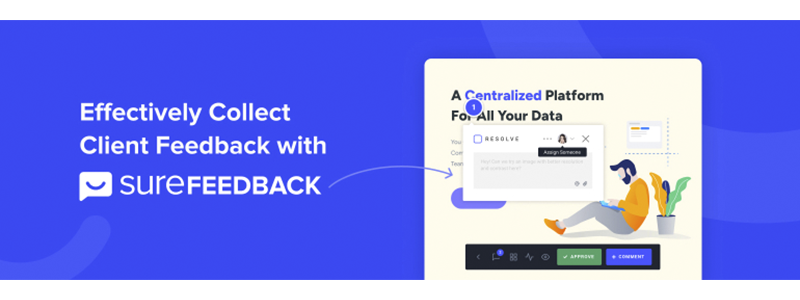
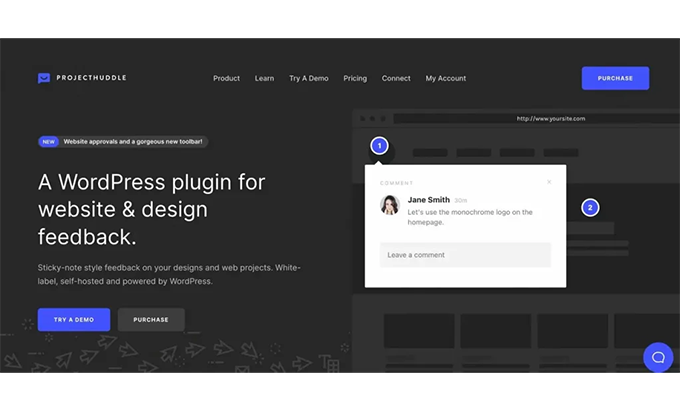
SureFeedBack is a visual feedback platform designed to streamline website and design reviews. Instead of chasing endless email threads, the conversation happens right on the page: the client clicks on a specific area, leaves their comment “stuck” like a note, and everything is centralized and organized. In our experience, this simplicity is a game-changer: conversations shift from “What do you mean by the banner above?” to “Adjust the padding of the CTA on this card,” with perfect context and zero ambiguity.
Beyond the live website, SureFeedBack shines with mockups and images. Whether the project is in Figma, Sketch, XD, or a high-fidelity PDF, we continue working with the same flow of clickable points, comments, mentions, and statuses. This continuity reduces friction between design and development: what’s agreed upon in the mockup is then validated on the live website, without switching tools or losing history. Furthermore, SureFeedBack retains revisions; if a change isn’t satisfactory, you can revert to a previous version without any hassle.
The solution is a particularly good fit for teams managing multiple clients or brands. SureFeedBack allows you to connect multiple sites and manage them from a single dashboard, simplifying prioritization: you can see which projects are holding up, which approvals are missing, and which tasks are ready to close. For us, the differentiating value is twofold: clarity (the feedback is pinpointed to the exact location) and traceability (who requested what, when, and in which version). When the goal is to deliver faster and with less back-and-forth, SureFeedBack becomes a natural ally.
How it works in practice: live websites, mockups, PDFs, and images
SureFeedBack’s workflow is straightforward. On a live website, we activate comment mode, and any contributor can click on an element: header, hero, cards, tables, or forms. A “pin” is generated with its conversation thread, and if necessary, attachments or screenshots are uploaded. When the team implements the adjustment, we mark the comment as resolved, leaving a clean record for audits or retrospectives.
With mockups, PDFs, and images, the pattern is the same: we upload the file, share a link, and reviewers comment on specific sections. This gives us two advantages: 1) moving forward without waiting for staging; 2) validating content and hierarchies before starting the layout process. In our practice, gathering feedback on the mockup and then validating it on the website with SureFeedBack reduces rework because the client sees the changes applied where they should be.
SureFeedBack also supports one-click approvals. When a screen or page is ready, we simply request “Approve,” and the status changes without the need for formal emails. The revision history records each stage, and if something goes wrong, we can revert it. For distributed teams, the mobile experience is key: customers can leave feedback from their phones, which speeds up the approval cycle when time is tight. In short, SureFeedBack brings together contextual feedback, statuses, and versions—what was previously scattered across emails, chats, and screenshots—all in one place.
Single panel and white label: manage multiple sites with your identity
If you work with multiple clients, a central dashboard is invaluable. SureFeedBack organizes projects and websites on a single panel, with filters by status (pending, in progress, approved) and the ability to mention people to direct actions. This macro view allows you to prioritize and anticipate bottlenecks: if a website accumulates unanswered comments, it rises to the top; if another is spotless, it goes straight to approval.
White labeling is another aspect we appreciate about SureFeedBack. Customizing the logo, colors, and—in some cases—the domains or notification emails creates a more professional experience and makes it feel less like a generic tool. For agencies, freelancers, and in-house teams, presenting SureFeedBack with its own identity reinforces trust and consistency with the rest of the process. In terms of permissions, the plugin allows you to invite clients, reviewers, and guests with different access levels: from free commenting to approval only. This fine-grained control prevents noise: those who need to decide, decide; those who only suggest, suggest.
In our day-to-day work, what we notice most is how the plugin eliminates invisible administrative tasks: there’s no more compiling comments into a document, interpreting ambiguous emails, or cross-referencing screenshots with links. Everything is contextualized and traceable. And, because the platform centralizes sites and files, the handover between design and development—or between the team and the client—becomes more organized, without losing any signals or prior agreements.
Time-saving integrations: Slack and automations with OttoKit
SureFeedBack integrations bridge the gap between feedback and action. With Slack, for example, we send notifications to a channel when a new comment appears or when someone approves a critical page. This eliminates “downtime”: the team is notified instantly and can take action. Beyond Slack, the OttoKit ecosystem (or similar connectors) unlocks hundreds of apps: from creating a card in your task manager to populating a spreadsheet or triggering a transactional email.
The real power lies in designing lightweight automations. Here are some workflows that worked for us with SureFeedBack:
-
When a comment contains the word “blocking”, create an urgent task labeled in the internal manager.
-
If a customer approve on the home page, move the project to the “final QA” stage and notify the person in charge.
-
Al close all comments on a page, generate a summary with links and screenshots for registration.
These simple rules transform it into an orchestration hub: visual feedback triggers processes in your tools without copying/pasting or interpreting notes. For teams seeking shorter cycle times, the combination of SureFeedBack + Slack + OttoKit reduces latency and lowers the chance of something “falling through the cracks.”
Recommended publishing and approval workflow (step by step)
-
Create the project in SureFeedBack. Name it with client + area (e.g. “BrandX — Website 2025”).
-
Upload mockups or connect the live site. Keep folders organized by section (home, services, blog, shop).
-
Invite clients and team. Define roles: who comments, who approves, who only views.
-
First round (design). Comments on hierarchy, visual tone, copy, and CTAs.
-
Second round (implementation). Validate details: spacing, responsiveness, basic accessibility.
-
1-click approval in SureFeedBack. Mark as approved by page/section.
-
Version closure. Generate snapshot or version tag for auditing.
-
Post-launch. Maintain a “maintenance” project for minor improvements with the same workflow.
With this approach, SureFeedBack structures the work into short cycles (design → adjustment → approval) instead of long cycles with scattered feedback. In our experience, the time-to-approve decreases because the client only needs to click the link, comment, and approve—without technical or contextual barriers.
Real-world use cases for agencies, freelancers, and in-house teams
Agencies: SureFeedBack centralizes active projects and reduces the hidden cost of interpretation. It’s ideal for sprint deliveries, where a specific section of the site is approved each week. One-click approvals document progress and ensure adherence to the agreed-upon scope.
Freelancers: In addition to professionalizing the white-label presentation, SureFeedBack helps educate the client: “comment at the right point, approve when ready.” This framework reduces out-of-scope requests and prevents last-minute changes without authorization.
Internal teams: In organizations with multiple departments (marketing, legal, product), SureFeedBack aligns expectations: each department provides feedback within its designated area, and threads are closed according to priority. The historical record is crucial for audits and compliance: who requested what, when, and why.
Design to development: Starting with mockups (Figma/Sketch/XD/PDF) and continuing in a live environment within SureFeedBack ensures the continuity of feedback. Fewer meetings, more informed decisions. In all scenarios, the platform transforms isolated conversations into clear tasks with assigned responsibilities, visible statuses, and outcomes.

Best practices: permissions, guest comments, and revision control
-
Permissions and roles. Before inviting anyone to SureFeedBack, define the matrix: who proposes changes, who decides, and who implements. This prevents “everyone having an opinion on everything.”
-
Guest comments. Useful for quick validations without creating accounts; even so, accompany them with a thread owner who closes any pending issues.
-
Checklist for each page. Minimum accessibility (contrast, focus, labeling), responsiveness (key breakpoints), microcopy (errors and confirmations), visible performance (hero weight). Mark as done in SureFeedBack only when the checklist passes on both desktop and mobile.
-
Labeling conventions. Use tags like “blocker”, “improvement”, “copy”, “SEO”, “bug”. In SureFeedBack, this allows threads to be filtered and addressed in the correct order.
-
Revision control. Close resolved threads and create a remake When the scope changes, leave explicit approvals to prevent regressions.
-
Avoid noise. Don’t turn SureFeedBack into a general chat. For long conversations without visual context, use your usual channel; leave SureFeedBack for anything related to a specific item.
With these guidelines, SureFeedBack stays agile and focused on what matters: resolving changes clearly. Furthermore, your decision history will be documented, simplifying audits, hand-offs, and learning for future iterations.
Conclusion
SureFeedBack brings order to the chaos of feedback: comments on the exact element, one-click approvals, a single dashboard for multiple sites, and automations ready to connect with your stack. In our experience, the plugin cuts down time, avoids confusion, and improves the final quality because everyone is communicating from the same perspective. If your goal is to deliver faster and with less friction—whether in design, development, or continuous growth—SureFeedBack is a robust foundation for achieving it.





Author
Description
SureFeedBack is a visual feedback platform designed to streamline website and design reviews. Instead of chasing endless email threads, the conversation happens right on the page: the client clicks on a specific area, leaves their comment “stuck” like a note, and everything is centralized and organized. In our experience, this simplicity is a game-changer: conversations shift from “What do you mean by the banner above?” to “Adjust the padding of the CTA on this card,” with perfect context and zero ambiguity.
Beyond the live website, SureFeedBack shines with mockups and images. Whether the project is in Figma, Sketch, XD, or a high-fidelity PDF, we continue working with the same flow of clickable points, comments, mentions, and statuses. This continuity reduces friction between design and development: what’s agreed upon in the mockup is then validated on the live website, without switching tools or losing history. Furthermore, SureFeedBack retains revisions; if a change isn’t satisfactory, you can revert to a previous version without any hassle.
The solution is a particularly good fit for teams managing multiple clients or brands. SureFeedBack allows you to connect multiple sites and manage them from a single dashboard, simplifying prioritization: you can see which projects are holding up, which approvals are missing, and which tasks are ready to close. For us, the differentiating value is twofold: clarity (the feedback is pinpointed to the exact location) and traceability (who requested what, when, and in which version). When the goal is to deliver faster and with less back-and-forth, SureFeedBack becomes a natural ally.
How it works in practice: live websites, mockups, PDFs, and images
SureFeedBack’s workflow is straightforward. On a live website, we activate comment mode, and any contributor can click on an element: header, hero, cards, tables, or forms. A “pin” is generated with its conversation thread, and if necessary, attachments or screenshots are uploaded. When the team implements the adjustment, we mark the comment as resolved, leaving a clean record for audits or retrospectives.
With mockups, PDFs, and images, the pattern is the same: we upload the file, share a link, and reviewers comment on specific sections. This gives us two advantages: 1) moving forward without waiting for staging; 2) validating content and hierarchies before starting the layout process. In our practice, gathering feedback on the mockup and then validating it on the website with SureFeedBack reduces rework because the client sees the changes applied where they should be.
SureFeedBack also supports one-click approvals. When a screen or page is ready, we simply request “Approve,” and the status changes without the need for formal emails. The revision history records each stage, and if something goes wrong, we can revert it. For distributed teams, the mobile experience is key: customers can leave feedback from their phones, which speeds up the approval cycle when time is tight. In short, SureFeedBack brings together contextual feedback, statuses, and versions—what was previously scattered across emails, chats, and screenshots—all in one place.
Single panel and white label: manage multiple sites with your identity
If you work with multiple clients, a central dashboard is invaluable. SureFeedBack organizes projects and websites on a single panel, with filters by status (pending, in progress, approved) and the ability to mention people to direct actions. This macro view allows you to prioritize and anticipate bottlenecks: if a website accumulates unanswered comments, it rises to the top; if another is spotless, it goes straight to approval.
White labeling is another aspect we appreciate about SureFeedBack. Customizing the logo, colors, and—in some cases—the domains or notification emails creates a more professional experience and makes it feel less like a generic tool. For agencies, freelancers, and in-house teams, presenting SureFeedBack with its own identity reinforces trust and consistency with the rest of the process. In terms of permissions, the plugin allows you to invite clients, reviewers, and guests with different access levels: from free commenting to approval only. This fine-grained control prevents noise: those who need to decide, decide; those who only suggest, suggest.
In our day-to-day work, what we notice most is how the plugin eliminates invisible administrative tasks: there’s no more compiling comments into a document, interpreting ambiguous emails, or cross-referencing screenshots with links. Everything is contextualized and traceable. And, because the platform centralizes sites and files, the handover between design and development—or between the team and the client—becomes more organized, without losing any signals or prior agreements.
Time-saving integrations: Slack and automations with OttoKit
SureFeedBack integrations bridge the gap between feedback and action. With Slack, for example, we send notifications to a channel when a new comment appears or when someone approves a critical page. This eliminates “downtime”: the team is notified instantly and can take action. Beyond Slack, the OttoKit ecosystem (or similar connectors) unlocks hundreds of apps: from creating a card in your task manager to populating a spreadsheet or triggering a transactional email.
The real power lies in designing lightweight automations. Here are some workflows that worked for us with SureFeedBack:
-
When a comment contains the word “blocking”, create an urgent task labeled in the internal manager.
-
If a customer approve on the home page, move the project to the “final QA” stage and notify the person in charge.
-
Al close all comments on a page, generate a summary with links and screenshots for registration.
These simple rules transform it into an orchestration hub: visual feedback triggers processes in your tools without copying/pasting or interpreting notes. For teams seeking shorter cycle times, the combination of SureFeedBack + Slack + OttoKit reduces latency and lowers the chance of something “falling through the cracks.”
Recommended publishing and approval workflow (step by step)
-
Create the project in SureFeedBack. Name it with client + area (e.g. “BrandX — Website 2025”).
-
Upload mockups or connect the live site. Keep folders organized by section (home, services, blog, shop).
-
Invite clients and team. Define roles: who comments, who approves, who only views.
-
First round (design). Comments on hierarchy, visual tone, copy, and CTAs.
-
Second round (implementation). Validate details: spacing, responsiveness, basic accessibility.
-
1-click approval in SureFeedBack. Mark as approved by page/section.
-
Version closure. Generate snapshot or version tag for auditing.
-
Post-launch. Maintain a “maintenance” project for minor improvements with the same workflow.
With this approach, SureFeedBack structures the work into short cycles (design → adjustment → approval) instead of long cycles with scattered feedback. In our experience, the time-to-approve decreases because the client only needs to click the link, comment, and approve—without technical or contextual barriers.
Real-world use cases for agencies, freelancers, and in-house teams
Agencies: SureFeedBack centralizes active projects and reduces the hidden cost of interpretation. It’s ideal for sprint deliveries, where a specific section of the site is approved each week. One-click approvals document progress and ensure adherence to the agreed-upon scope.
Freelancers: In addition to professionalizing the white-label presentation, SureFeedBack helps educate the client: “comment at the right point, approve when ready.” This framework reduces out-of-scope requests and prevents last-minute changes without authorization.
Internal teams: In organizations with multiple departments (marketing, legal, product), SureFeedBack aligns expectations: each department provides feedback within its designated area, and threads are closed according to priority. The historical record is crucial for audits and compliance: who requested what, when, and why.
Design to development: Starting with mockups (Figma/Sketch/XD/PDF) and continuing in a live environment within SureFeedBack ensures the continuity of feedback. Fewer meetings, more informed decisions. In all scenarios, the platform transforms isolated conversations into clear tasks with assigned responsibilities, visible statuses, and outcomes.
Best practices: permissions, guest comments, and revision control
-
Permissions and roles. Before inviting anyone to SureFeedBack, define the matrix: who proposes changes, who decides, and who implements. This prevents “everyone having an opinion on everything.”
-
Guest comments. Useful for quick validations without creating accounts; even so, accompany them with a thread owner who closes any pending issues.
-
Checklist for each page. Minimum accessibility (contrast, focus, labeling), responsiveness (key breakpoints), microcopy (errors and confirmations), visible performance (hero weight). Mark as done in SureFeedBack only when the checklist passes on both desktop and mobile.
-
Labeling conventions. Use tags like “blocker”, “improvement”, “copy”, “SEO”, “bug”. In SureFeedBack, this allows threads to be filtered and addressed in the correct order.
-
Revision control. Close resolved threads and create a remake When the scope changes, leave explicit approvals to prevent regressions.
-
Avoid noise. Don’t turn SureFeedBack into a general chat. For long conversations without visual context, use your usual channel; leave SureFeedBack for anything related to a specific item.
With these guidelines, SureFeedBack stays agile and focused on what matters: resolving changes clearly. Furthermore, your decision history will be documented, simplifying audits, hand-offs, and learning for future iterations.
Conclusion
SureFeedBack brings order to the chaos of feedback: comments on the exact element, one-click approvals, a single dashboard for multiple sites, and automations ready to connect with your stack. In our experience, the plugin cuts down time, avoids confusion, and improves the final quality because everyone is communicating from the same perspective. If your goal is to deliver faster and with less friction—whether in design, development, or continuous growth—SureFeedBack is a robust foundation for achieving it.










Reviews
There are no reviews yet.